

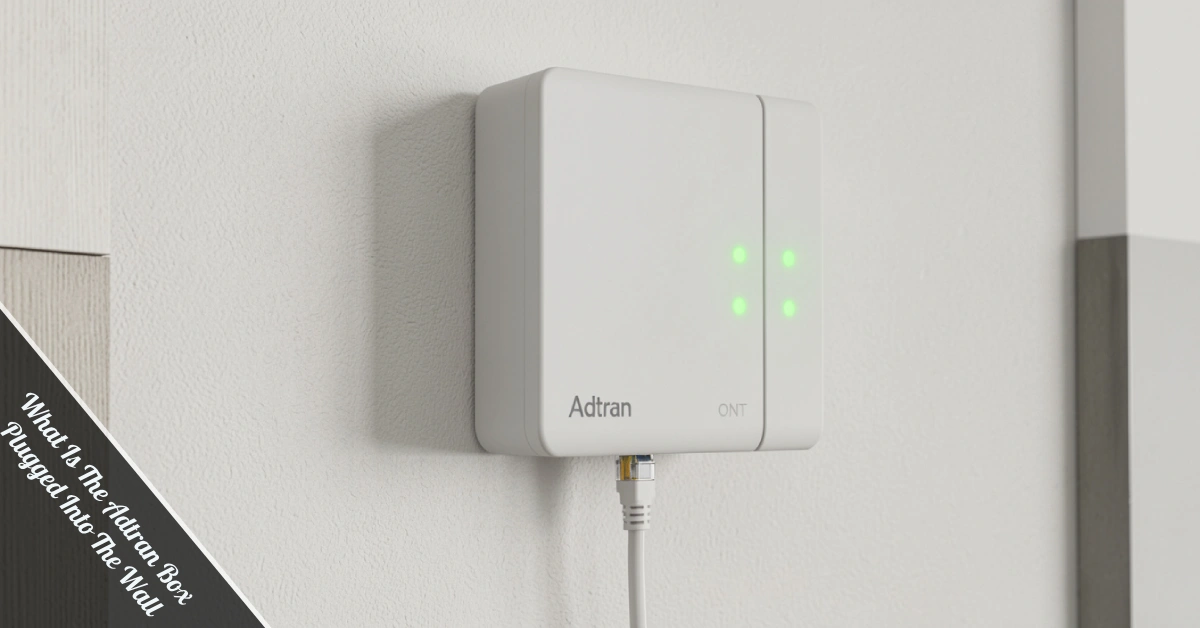
You noticed a little box mounted on your wall. It’s got some blinking lights, a few cables running out of it, and absolutely zero explanation attached. Sound familiar? If you’ve been wondering what is the Adtran box plugged into the wall is, you’re definitely not alone. Thousands of homeowners and renters find themselves staring at this mysterious device every day.
Here’s the good news — it’s nothing scary. That box is actually doing some serious heavy lifting for your home internet connection. Let’s break it all down in plain English.
What Exactly Is an Adtran Box?
Adtran is a telecommunications equipment company that makes networking hardware for internet service providers (ISPs). When your ISP installs fiber or broadband service at your home, they often use Adtran equipment to make the connection work.
The box you see on your wall is typically an ONT, which stands for Optical Network Terminal. Think of it as the translator between your ISP’s fiber-optic network outside and the regular internet connection inside your home. It works with a technology called GPON (Gigabit Passive Optical Network) or the newer XGS-PON, which is the technical magic behind how fiber delivers such fast speeds — especially the symmetric gigabit speeds where your uploads are just as fast as your downloads.
Without it, your Wi-Fi router has nothing to work with. So when people ask what is the Adtran box plugged into the wall, the short answer is: it’s the device that brings internet into your home.
Why Is It Installed in Your Home?
Your ISP installs this device during your initial setup appointment. Fiber internet works differently than traditional cable — it uses light signals traveling through thin glass cables. Your home’s regular Ethernet cables can’t read light signals directly. That’s where the Adtran box steps in.
It converts those light signals into an electrical signal your router can understand. No Adtran box, no fiber internet. It’s that simple. The device is usually mounted near the entry point of your main phone line or where the fiber cable enters your home — a spot technicians call the “demarcation point,” which is the official boundary where your ISP’s responsibility ends and your home network begins.
Some providers, like AT&T Fiber, Frontier, Sonic, or Ting, use Adtran-branded ONTs specifically. If you’ve got fiber, there’s a solid chance that’s exactly what you’re looking at.
| Feature | Adtran ONT | Traditional Modem | Wi-Fi Router |
|---|---|---|---|
| Converts fiber signals | ✅ Yes | ❌ No | ❌ No |
| Provides Wi-Fi | ❌ No | ❌ No | ✅ Yes |
| Installed by the ISP | ✅ Usually | ✅ Sometimes | ❌ Rarely |
| Can be self-installed | ❌ Rarely | ✅ Often | ✅ Yes |
Common Adtran Models You Might See at Home
Adtran makes several ONT models for residential use, and depending on your provider and when your service was installed, you might have one of these:
- Adtran 411 — a widely used older model, compact and reliable.
- Adtran 424RG (or 424RG3) — a newer unit that actually combines the ONT and a Wi-Fi router into one device, which is why some people get confused about what does what.
- Adtran SDX 601qv — part of the modern SDX 600 series, designed to support faster internet speeds with a sleeker design.
- Adtran 622v / 621X — often used for premium 10Gigabit or small business fiber services.
While these models look different, they all do the same essential job: turn light into internet.
What Are All Those Ports and Features?
If you take a closer look at your Adtran box, you might notice a few extra connection points that serve specific purposes:
- Ethernet port (RJ-45) — this is where the cable connects to your router. It’s the main internet highway into your home network.
- Phone jack (RJ-11) for POTS or VoIP — many models include a port for landline telephone service over fiber, so your home phone can work through the same connection.
- 12V DC power adapter port — the standard power input for these units. A loose or faulty power plug is one of the most common reasons the box stops working.
- UPS connector or battery backup port — some models have a spot for an Uninterruptible Power Supply, which can keep your internet (and more importantly, your phone) running for a few hours during a power outage.
- SFP or SFP+ port — an advanced interface that allows the ONT to connect directly to high-end networking equipment, though this is rare in standard home setups.
You don’t need to use all of these — most homes only use the Ethernet and power ports. But knowing what they’re for can help you make sense of the box’s layout.
Can You Unplug or Move the Adtran Box?
Short answer? You probably shouldn’t — at least not permanently. Understanding what is the Adtran box plugged into the wall makes it clear why unplugging it means losing your internet connection entirely. It’s not like unplugging a lamp.
That said, a brief unplug to restart it is totally fine and is actually one of the first troubleshooting steps recommended when your connection drops. Just give it about 30 seconds before plugging it back in. Moving it to a different location permanently is a different story — the fiber cable coming into your wall is fixed, and moving the box requires a technician.
Never try to open the box or tamper with the fiber cable itself. Fiber cables can cause eye damage if handled improperly, and any tampering could void your ISP agreement. Also, be aware that the fiber connector (often a green SC/APC connector) is extremely sensitive — even a tiny speck of dust on the end can ruin your connection. That’s one more reason to leave the cables untouched.
How Does It Differ From a Modem or Router?
People mix these up all the time, so let’s clear the air quickly:
- Adtran ONT (your wall box): Converts fiber-optic signals into Ethernet. Handles the ISP-side connection. Usually installed and owned by your ISP.
- Modem: Translates signals from cable or DSL lines. If you have fiber, you likely don’t have a separate modem — the ONT handles that job.
- Router: Distributes internet wirelessly throughout your home via Wi-Fi (like 802.11ac or newer standards). This is the box you control, and it connects to the Adtran ONT via an Ethernet cable.
So the typical fiber internet setup looks like this: Fiber cable → Adtran ONT → Ethernet cable → Your router → Your devices. It’s a team effort, and each device plays its own role.
Common Issues and Simple Troubleshooting Tips
If your internet is acting up and you’re eyeing that Adtran box, here’s what to check:
Blinking lights look abnormal? Most Adtran boxes have indicator lights. A solid green light usually means everything’s good. Red or flashing amber often signals a connection issue on the ISP’s end — not something you can fix yourself.
No internet at all? Do the classic restart: unplug the Adtran box from the power outlet, wait 30 seconds, plug it back in. Then restart your router too. This fixes most temporary connection drops without a tech visit.
Loose or damaged cables? Check that the Ethernet cable running from the Adtran box to your router is securely plugged into both ends. A partially connected cable is a surprisingly common culprit. Also ensure the 12V DC power adapter is firmly connected to both the box and the wall outlet.
Need a deeper reset? Some models have a physical reset button (usually small and recessed) that you can press with a paperclip. Use this only as a last resort, as it may reset your configuration.
Still no luck? Contact your ISP. Since they own the Adtran equipment, any hardware failure is their responsibility to fix or replace — usually at no cost to you. Technicians often use tools like an optical power meter to test the light signal levels, which is something only they can do.
Is It Safe? Should You Be Worried?
Absolutely no need to panic. Knowing what is the Adtran box plugged into the wall puts you ahead of most people who just ignore it. It’s a standard, ISP-installed piece of equipment that operates quietly in the background.
It doesn’t collect your data beyond what your ISP already handles. It doesn’t create any health concerns. It simply does its job — bridging your home to the internet — and then minds its business. The only real “risk” is unplugging it and losing your connection, which is easily reversible.
If your box looks physically damaged, cracked, or shows signs of water exposure, contact your ISP immediately. They’ll send a technician to inspect or replace it.
What If You’re Moving or Canceling Service?
When you cancel or move, the Adtran box typically stays in the home — it’s ISP property. Don’t take it with you or throw it away. Your ISP will either retrieve it or leave it for the next tenant. Some ISPs may ask you to ship it back or drop it off.
If you’re moving to a new address, a new Adtran box will be installed at your new place during setup. The one in your current home isn’t yours to keep.
Conclusion
So there you have it. What is the Adtran box plugged into the wall? It’s your fiber internet’s secret handshake device — the ONT that converts light signals from your ISP’s network into usable internet for your home. Whether you have an older Adtran 411 or a newer SDX 601qv, the job is the same. It’s ISP-owned, essential for fiber service, and almost entirely maintenance-free from your end.
Restart it when your internet drops, leave it plugged in, don’t move it, and call your ISP if something looks wrong. That’s your entire job description as a homeowner when it comes to this device. Easy, right?
Got questions about your specific setup? Drop them in the comments — happy to help you figure out what’s going on with your connection.